# Install Handled Locator on Webflow
Source: https://locator.handledlocal.com/docs/install-webflow
Paste the complete locator snippet into a Webflow Code Embed element and verify the published site.
## Before you install
Add and review the locations in Handled, finish the visible design and connect a browser key for the selected map provider. Copy the complete snippet from **Embed & Install**.
Shape of the embed:
```
```
Webflow's [Code Embed reference](https://help.webflow.com/hc/en-us/articles/33961332238611-Custom-code-embed) describes its current custom-code availability and supported HTML, CSS and JavaScript.
If your locations already live in a CMS collection, connect it with [Webflow CMS sync](https://locator.handledlocal.com/docs/webflow-cms-sync) rather than re-entering them: the locator reads the collection on a schedule and geocodes each item.
## Add the Code Embed
1. **Open the locations page**: Open the page in the Webflow Designer and choose the container that should own the locator width.
2. **Add Code Embed**: Drag a Code Embed element into that container and paste the complete Handled snippet into its code panel.
3. **Publish the site**: Save the embed and publish to the real Webflow domain or connected custom domain.
> **The published site is the real test**
>
> A third-party script may not execute as a complete locator inside the Designer canvas. Open the published URL before treating an empty design-time placeholder as an installation failure.
## Publish and verify
Run **Check installation** in Handled against the exact published URL. Then test a search, a filter and directions on the page itself.
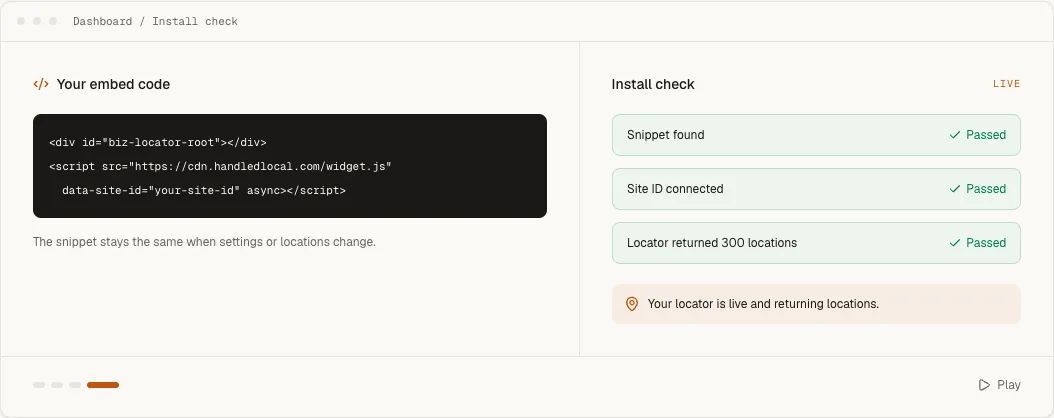
Verification confirms that Webflow published the snippet and connected the right locator.
## If the embed stays blank
Confirm that the site was republished after the embed changed. Inspect the Code Embed for a complete `