# Install Handled Locator on Wix
Source: https://locator.handledlocal.com/docs/install-wix
Add a visible HTML embed to a Wix page, give it enough height and verify the published site on desktop and mobile.
## Before you install
Finish the public location list, locator design and map-provider connection in Handled. Copy the complete snippet from **Embed & Install**. For a visible locator, use Wix's page-level HTML embed rather than the dashboard's invisible tracking-code area.
Shape of the embed:
```
```
Wix describes the visible option in its [Embedding a Site or a Widget guide](https://support.wix.com/en/article/wix-editor-embedding-a-site-or-a-widget).
## Add the HTML embed
1. **Add the visible element**: Open **Add Elements**, choose **Embed Code**, then add the HTML or widget embed to the locations page.
2. **Paste the snippet**: Choose **Embed HTML**, paste the complete Handled snippet and apply the change.
3. **Size the element**: Stretch the element to the page width available for the locator and give it enough height to show search and results without clipping.
4. **Publish**: Publish the Wix site and open the real visitor-facing URL.
## Publish and verify
Run **Check installation** in Handled against the published Wix URL. Test the desktop and mobile layouts because Wix lets the embed element have different dimensions in each editor.
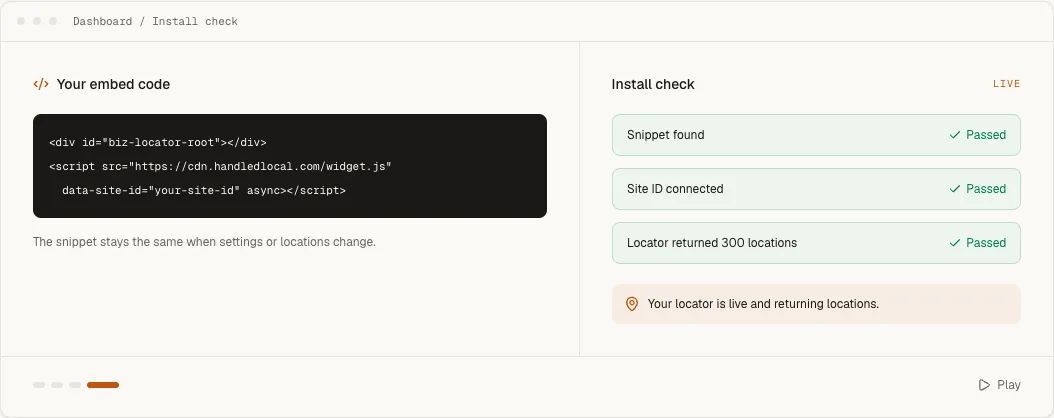
A passing check confirms that the Wix page loaded the right Handled account and locations.
## If Wix clips the locator
Increase the HTML element's height in both the desktop and mobile editors. A visible Wix HTML embed runs inside its own frame, so page-level code cannot automatically resize it around changing result counts.
> **Widget events stay inside the Wix frame**
>
> Browser events emitted by the locator do not cross Wix's iframe boundary into the outer page document. Use Handled analytics for the standard interaction report. A custom Wix integration for forwarding those events is not included.