
The one thing to understand: Wix embeds live in an iframe
On WordPress, Squarespace or Webflow, pasted embed code runs in the page itself, so the widget takes whatever height its content needs. Wix is the exception: the Embed HTML element wraps your code in an iframe, a sealed browser-within-a-browser with a fixed width and height that you set in the editor.
Both consequences of that follow directly. The locator cannot expand the frame when a search returns a long list, so a frame that is too short clips results behind an inner scrollbar, and one that is too tall leaves a blank band under the widget. And the page and the widget cannot see each other at all, which is a kind of isolation even stronger than the shadow root used elsewhere: nothing about your Wix theme can affect the widget, and nothing the widget does can affect the page.
Neither consequence is a dealbreaker. They just mean the height is a decision you make rather than one the browser makes for you, and the steps below treat it that way.
Add it, step by step
Data first, as on every platform: import and review locations in the locator dashboard before touching Wix, because an empty locator embeds as an empty frame.
- Prepare one row per location and import it, fixing what the report flags. The data guide covers the columns worth having.
- Style the widget in the locator dashboard: typeface, colours, markers and map style. Inside the frame, the widget's own settings are the only styling that applies.
- In the Wix editor, add an Embed Code element and choose Embed HTML, then paste the embed code into it.
- Size the frame generously: full content width, and tall enough that the search box, filters, the map and at least the first two or three results are visible without inner scrolling. Err tall; a modest blank band beats a clipped list.
- Switch the editor to the mobile view and size the frame again for phones. Wix holds desktop and mobile sizes separately, and the phone height is the one visitors will actually live with.
- Publish, open the public URL on desktop and on a real phone, and adjust the two heights once against reality. One round of adjustment is normal; treat it as part of the install, not a failure.
Getting the height right without guessing
A practical target: on desktop, the frame should show the search controls and roughly the first screenful of results next to the map, which for most locators lands between 700 and 900 pixels of height. On phones, where the widget stacks vertically, the frame usually needs to be taller than the desktop, not shorter, which surprises people; 900 to 1100 pixels is a sane starting range, then adjust against the published page.
If your result counts vary wildly by search, prefer a height that fits the common case and let the rare long list scroll inside the frame. An inner scrollbar on a twenty-result search in a rural area is a fair trade; one on every three-result search in your core towns is not.
The checks before you call it done
All on the published site. The Wix editor renders the frame but not your final layout context.
- Search your busiest town and confirm the first results are visible without inner scrolling, on desktop and phone.
- Search a town you do not serve and confirm the empty state shows inside the frame, not a blank void.
- Tap phone and directions links on a real phone; both should leave the frame and open the dialler and maps app.
- Check the frame's phone height with the keyboard open, which eats a third of the viewport.
- Confirm the page is in navigation and loads correctly in a private window.
Where Handled Locator fits
Handled Locator works in Wix exactly as described: one Embed HTML paste, with locations from CSV or a synced Google Sheet, 85+ settings for styling and behaviour, and your own Google Maps or Mapbox key billed at provider cost. The widget's compact layouts help here, since a tidy vertical stack needs less frame height on phones.
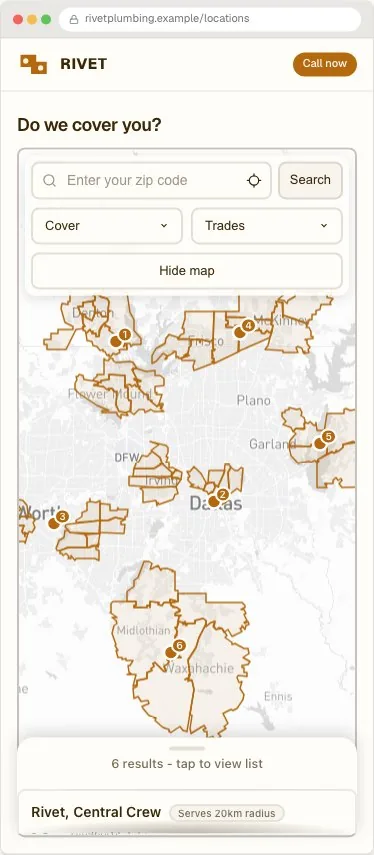
Plans start at $19 a month for 200 locations. The Wix platform page keeps the current install steps, and the live examples include the Rivet service-area setup pictured above.
Frequently asked questions
Why is my Wix store locator cut off at the bottom?
The Embed HTML element is an iframe with a fixed height, and the widget cannot grow it. Open the editor, make the element taller, and set the mobile height separately in the mobile editor view. One adjustment round against the published page is normal.
Does Wix have a built-in store locator?
Wix has map elements that pin addresses, and app-market locators of varying quality, but nothing built in with proximity search, filters and styled result cards. A hosted locator in an Embed HTML element is the standard route.
Why does the locator look different from my Wix theme?
The iframe seals the widget off from the page completely, so it inherits nothing. Match the brand in the locator's own settings, typeface, colours and markers, and the frame's contents will agree with the page around it.
Why do phone and directions links still work inside the frame?
Links that open another app, the dialler or a maps app, are allowed to escape an iframe. Visitors get the normal experience even though the widget is sealed.
Should I use a Wix app-market locator instead of an embed?
The app route can be fine; evaluate it like any locator: where the data lives, whether you can export it, who pays for the map, and what the result cards can show. The embed route keeps the data portable across site builders, which matters if Wix is not forever.
How do I update locations after launch?
In the locator dashboard or the synced sheet; the frame shows the changes on next load. The Wix editor is only needed if the frame's size has to change.