Store locator features, without the hidden gaps.
All 85+ available settings are live today and included on every paid plan. Below is what they give a visitor, followed by the product boundaries most software companies leave out.
New to the category? What store locator software does covers the pieces every tool has, before the ones that differ.

A dealer network with category filters and a results grid. Real widget, sample data.
Explore a capability
Start with the part of the locator you are deciding about.
Each page pairs the product claim with a rendered DOM capture, the setup workflow, its practical boundary and the documentation needed to use it.
Location management
Add, import, organize and safely update physical stores, service areas and online stockists in Handled Locator.
Explore featureStore search
Let visitors search locations by town, postcode or name, sort by distance, filter by radius and open directions.
Explore featureCustom filters
Create filter groups for products, services, store types, accreditations and amenities with match-any or match-all behavior.
Explore featureMap customization
Match a store locator to your website with seven layouts, custom marker artwork, Mapbox Studio styles, Google Map IDs and scoped CSS.
Explore featureLocator analytics
Measure locator sessions, search outcomes, directions, visitor actions, top locations and geographic unmet demand.
Explore featureCSV import
Map spreadsheet columns, geocode addresses, review duplicate or incomplete rows and import locations without silently dropping failures.
Explore featureSearch and discovery
A visitor finds the nearest one in about five seconds.
The locator opens, the visitor types a town or postcode, and the list reorders by distance. Everything below is a setting you control, not a fixed behaviour.
North Loop Cycles
1.2 mi · Open until 6:00
Eastside Bike Works
2.8 mi · Open until 7:00
Hill Country Service
4.6 mi · Opens tomorrow
Search stage: Austin locations are filtered to repair shops, sorted by distance, and the nearest result offers directions.
Sync from Google Sheets, Airtable, Webflow CMS or HubSpot
Connect a sheet, an Airtable table or view, a Webflow collection or a HubSpot company list, map its fields and preview creates, updates, conflicts and missing rows before the first apply. Run it manually or every 15 minutes, hour or day; only mapped fields change, and a missing row never deletes a location.
DocumentationSearch by town, postcode or name
Addresses autocomplete as the visitor types, restricted to the countries you serve. Choose what search matches, whether it sits above the map or results, whether it carries an icon, and whether the filtered view can be linked to and shared.
DocumentationFind locations near me
Ask the browser for the visitor's position on load, or leave it to a button they press. Results sort by distance in miles or kilometres, formatted the way the visitor's region expects.
DocumentationRadius filter
Let visitors narrow to what is within a distance they will actually travel, with a default radius you set and a marker on the map showing the area being searched.
DocumentationCategories, tags and open now
Group locations by product, service, accreditation or anything else. Filters can match any or all selections, show a count beside each option, and sit inline or in a dropdown. An open-now filter uses each location's real opening hours.
DocumentationDirections in one tap
Every result carries a directions button that opens Google Maps or Apple Maps on the visitor's own device, plus an optional print view for anyone who still wants paper.
DocumentationEmpty states that say something
Decide what a visitor sees before they have searched and what happens when nothing is nearby: show every location with a note, or a clear empty state with a button to search a wider area. Online stockists stay available in their own tab.
Documentation
Your locations
Get your list in once, keep it right afterwards.
Most locators die at the import step. This one takes the spreadsheet you already have and tells you about the rows it could not read instead of dropping them quietly.
locations.csv
300 rows · 6 columns
Upload stage of the location import review.
CSV import with column mapping
Upload the file you already keep. Columns are detected and mapped for you, addresses are geocoded, and duplicate rows are caught before they land. Rows that fail come back with the reason attached.
DocumentationEverything a location can carry
Address, coordinates, phone, email, website, description, image, opening hours, categories and your own custom fields. Custom actions can carry a label, URL, color and icon, so booking and ordering links look intentional in cards and popups.
DocumentationOpening hours with live status
Add hours per location and the locator works out the rest: open until, opens at, closed now, closed today, or opens on the next open day. Set which day the week starts and place the live status or full weekly schedule in result cards, details and map popups.
DocumentationPriority and sort order
Promote flagship sites, preferred dealers or key partners above the rest, with a radius beyond which priority stops applying so a promoted branch never outranks the one across the road.
DocumentationDealer territories by postcode
Paste the postcodes from a dealer's agreement, as a spreadsheet column, a comma list or a paragraph, and exclude the ones that belong to somebody else. An entry ending in an asterisk covers a prefix, so 750* or M5V* takes a district or an FSA without listing every code inside it. Publish, and an address inside that patch resolves to the dealer who holds it: pinned above the rest of the network, or shown as the only result, depending on the mode. Where two territories cover the same address, a rank number you set decides rather than which one is smaller, and a test box names the owner of any address and the exact rule that decided. It applies to a typed address search, since a browser location or an autocomplete pick carries no postcode and ranks by distance as before.
DocumentationEnquiries routed to the dealer who owns the address
Turn on the enquiry form and a visitor can send their name, email, phone and message from the locator after they search. The visitor does not pick who receives it: the server routes the enquiry to the dealer whose published territory covers the address, then to the fallback location you set, then to the nearest. That dealer is emailed with the reason they were chosen, replies go straight back to the customer, and they can mark it handled from a link in the email without an account. Every enquiry is listed under Leads in your dashboard. It is off unless you switch it on.
DocumentationRules for where and when someone searches
Spotlight changes what a visitor is shown based on where they are searching and when. Draw an area on the map, give a radius, list postcodes, or pick a tag filter, then attach one of four outcomes: a banner above the results with your wording and a link, certain locations moved to the top, only certain locations shown, or certain ones hidden. Every rule can carry a start and an end, so a regional promotion switches itself on and off. Rules apply in the order you list them, after territories, and a panel on the page checks any rule against a place you type before a visitor ever meets it.
DocumentationTidy data without editing it
Phone numbers formatted to a convention, names capitalised consistently, postcode prefixes handled per country. Your source file stays as it is.
DocumentationExport whenever you want
Take your locations back out as CSV at any time, in the shape you put them in. Your data is not the lock-in.
DocumentationWebhooks when a location or lead changes
Register an HTTPS endpoint and Handled calls it, signed, when a location is created, updated or deleted and when a visitor sends an enquiry. Retried for two days, with a delivery log, and manageable over the API so a Zap can subscribe itself.
DocumentationREST and Query APIs
Connect your own systems with account-scoped API keys. The REST API reads, creates, updates and archives locations, while the Query API returns visible locations near a point or matching a filter for a custom front end.
DocumentationManage it from Claude or ChatGPT
An MCP server exposes the locator to AI assistants, so a pasted list of addresses becomes geocoded locations, and tags, buttons, styling and wording can be changed by describing them. Connecting is a sign-in rather than a key, and every configuration change is proposed with a before-and-after before it goes live.
Documentation
Design
It should look like part of your site, not a widget on it.
Every capability shown on this page is live today. The locator renders in a shadow root, so your CSS cannot break it and it cannot break yours.

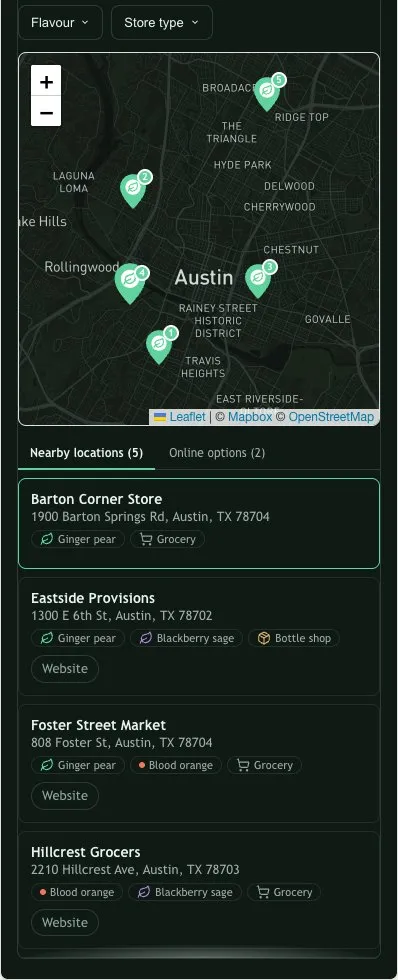
Responsive mobile preview
Layout stage of the responsive brand design.
No Handled branding, on any plan
The widget carries no attribution of ours at any tier. There is no badge to pay to remove and no plan that adds one. The only credit shown is the map provider's, which Mapbox and OpenStreetMap require under their own licences and no locator can remove.
DocumentationSeven layouts and detailed result controls
Put the map beside, above or outside the results, use a list or grid, and tune the result-column width, alignment, scrollbar, selected state, outer frame, distance placement and responsive heights.
DocumentationMarkers that carry your brand
Use dots, pins, your logo or uploaded marker artwork with its own size and coordinate anchor. Add marker numbers, cluster crowded areas, and choose circular, rounded or square cluster bubbles.
DocumentationBuilt-in or custom provider map styles
Choose Mapbox or Google Maps with streets, light, dark and satellite starting themes. Connect a published Mapbox Studio Style URL or Google cloud Map ID when the map itself needs to follow your brand.
DocumentationYour own CSS when you need it
Colours, fonts, corner radius and spacing are all controls rather than code. When a design needs something the controls do not cover, you can write CSS against the widget directly.
DocumentationStart from your website, or ask us to do it
Enter a public website URL in Appearance and Handled prepares an editable first draft from its brand signals. Prefer a guided setup? Send us the site and the locator's job; we configure it, review desktop and mobile, and include one revision on active Starter, Pro or Business plans.
DocumentationEvery word is yours
There is no string in the locator you cannot change. Rename Filters to Ranges, rewrite the empty state, translate the whole thing into another language.
DocumentationStart from a worked example
Six starting points, each a real running locator rather than a screenshot: logo pins for food brands, clustered pins for stockists, a filtered grid for dealer networks, a coverage radius for mobile services.
Documentation
When you grow
The parts that only matter once the list gets long.
A locator with twelve branches is easy. These are the things that start to matter at two thousand.
Search demand
Areas visitors looked for this month
10,000
tested self-serve ceiling
1.65s
first result at 5,000
Searches with no nearby result
143
A shortlist of where customers want you next.
Demand stage of the search analytics view.
Built for large lists
Results page in as the visitor scrolls rather than loading everything at once, and the public query is served by an index built for it. Verified at 5,000 locations with the first result on screen in 1.65 seconds.
DocumentationService areas, not just addresses
A location can be a zone rather than a point. Set a coverage radius and the map draws it, which is what a mobile or delivery business actually needs to show.
DocumentationOnline stockists
Show ecommerce sites and distributors alongside physical results, in their own tab, which stays available when nothing is nearby.
DocumentationSearch analytics
Which areas visitors search, which locations get opened, and where people are looking without finding anything. That last one is the useful one: it is a map of where to expand.
Documentation
Installing it
One line of script, then it is live.
No plugin to keep updated, no app to authorise, no build step, nothing to redeploy when you change a setting.
<div id="biz-locator-root"></div>
<script src="https://cdn.handledlocal.com/widget.js"
  data-site-id="your-site-id" async></script>
The snippet stays the same when settings or locations change.
Install check
PastePaste stage of the widget install check.
Works where your site already is
Shopify, WordPress, Squarespace, Webflow and Wix each have a step-by-step guide, and any page you can paste HTML into works the same way.
DocumentationUnder 100 KB, gzipped
That is the whole thing, including search, filters and the results list. It loads after your page rather than blocking it.
DocumentationChromium, Firefox and WebKit
Verified against the deployed build running on a third-party origin, not in a development server on our own machine.
DocumentationSettings change without redeploying
Change a setting in the dashboard and the live locator picks it up. You do not touch the snippet again after you paste it.
DocumentationDrive it from your own page
The embedded element is scriptable: run a search, search near a point, set or clear filters, open or close a location, ask for the visitor's position, switch language, or read back what is currently shown. Calls made before the locator has finished loading are queued rather than lost, so your own search box or a link on a product page can drive it without waiting for anything.
DocumentationVersioned browser events
Listen for privacy-safe events when the locator is ready, a visitor searches, selects a location, gets no results, requests directions or clicks a configured action. Payloads exclude the visitor's query, coordinates and contact details.
Documentation
One line of script. Wherever your site lives.
The locator is a single custom element. If you can paste HTML into a page, you can install it. There is no plugin to keep updated and no app to authorise.
Three ways to do this, and what each one costs you.
Not a scoreboard against named products. The decision really only takes three shapes: buy a hosted widget, install a plugin, or build it yourself. Here is what changes between them.
| Compared on | Handled Locator | A store locator plugin | Custom development |
|---|---|---|---|
| Time to something live | One guided setup from a spreadsheet, inside the 7-day trial. | Minutes to install. The time goes afterwards, into making it look like it belongs there. | Weeks, and the first of them goes on the data model rather than the map. |
| Matching your site | Colour, type, corner radius, marker shape and every visible word are settings. No CSS to write. | Typically an accent colour and a logo. Past that you are overriding a stylesheet you did not write. | Anything at all, because you are the one writing it. |
| Who bills you for the map | Your own Mapbox or Google key. The provider meters it and bills you directly; we add no margin. | Often bundled into the subscription, so map traffic is priced in rather than shown to you. | Your key, plus the code that has to talk to it. |
| How large it can get | Up to 10,000 locations self-serve, paged as the visitor scrolls, on an indexed public query. | Depends entirely on the implementation. Worth testing against your real list before you commit to it. | Whatever you engineer for, at the cost of engineering for it. |
| Keeping it working | One script tag. Fixes ship to the hosted widget, so there is nothing on your site to update. | Updates arrive on the platform's schedule and land on your live site when they do. | Every browser change and provider deprecation is yours to notice and yours to fix. |
| What it costs | From $19 a month, published, with the location capacity and seat count printed beside it. | Varies. The question to ask is whether map usage is included, and what happens when you pass it. | Someone to build it, then someone to keep it alive. The second one is the expensive one. |
Where a column says it varies, it varies. We are not going to publish a figure for a product we do not run, and a number nobody can source is worth less to you than the admission.
Being straight with you
What we have not built.
Everything here is something a competitor sells today. If one of them is the reason you are shopping, buy theirs. We would rather you knew now than found out at the install screen.
A page per location
The locator is embedded in a page you already have, and generates none of its own. A page carrying your brand has to be as designable as the widget is, and until it is, offering a plain one would be selling the wrong thing.
Request thisManaged bidirectional CRM or ERP synchronization
Handled reads locations from Google Sheets, Airtable, Webflow CMS and HubSpot on a schedule, emits signed webhooks when a location or lead changes, and the REST and Query APIs read and write on demand. What it does not do is write back into those systems: a change made in the locator reaches your CRM only through a job you write against the webhooks and the API.
Request thisMore than one locator per account
One account styles and serves one locator, and the embed snippet carries no configuration id, so a second locator with its own colours, layout and wording is not something you can set up. A single page can be narrowed: the snippet takes a tag list and a starting place, so a product page can show only its own stockists. What it cannot do is look different from the locator everywhere else.
Request thisTranslated location details
The locator's own controls can be held in several languages and matched to each visitor. Your location data cannot: a store's name, description and custom fields are stored once and read the same to everyone. Platforms that do translate the data give each language its own copy of every location and its own locator, which is the gap above as much as this one.
Request thisCounty and state territory areas
A territory is a list of postcodes, which is how most dealer agreements are written anyway, and a service area is a radius the map draws. A county or a state cannot be picked by name in the dashboard: the rule can be stored and the engine resolves it, but there is no region picker to author one and no boundary data is loaded outside the United States, so a rule naming a British county or a Canadian region covers nothing. Shapes can be drawn on a map, but they belong to Spotlight, which decides what a visitor is shown rather than who owns an address, so a drawn area cannot route an enquiry.
Request this
Tell us what is blocking your purchase. Requests go to a person and help decide what is built next; this is not a promise of a date.
Request a featureWhen you get stuck
You reach the person who built it.
Email and live chat on every plan, including the trial. Not a tier, not a queue, and not a bot pretending to be a person. Matching your brand, wiring up filters, or an import that will not behave: the reply comes from whoever wrote that part of the product.
Something unusual in mind?
An integration that is not listed, a setup that does not fit the shapes above, or a feature from the list we have not built. Tell us what it is and what it is for. We will tell you straight whether it is something we would build, and when.
Try it on your own list.
Import your locations, style it, put it on your site. Seven days, no card, and a guided setup that starts from the spreadsheet your addresses are already in.