Location management
Keep the location list accurate without rebuilding the locator.
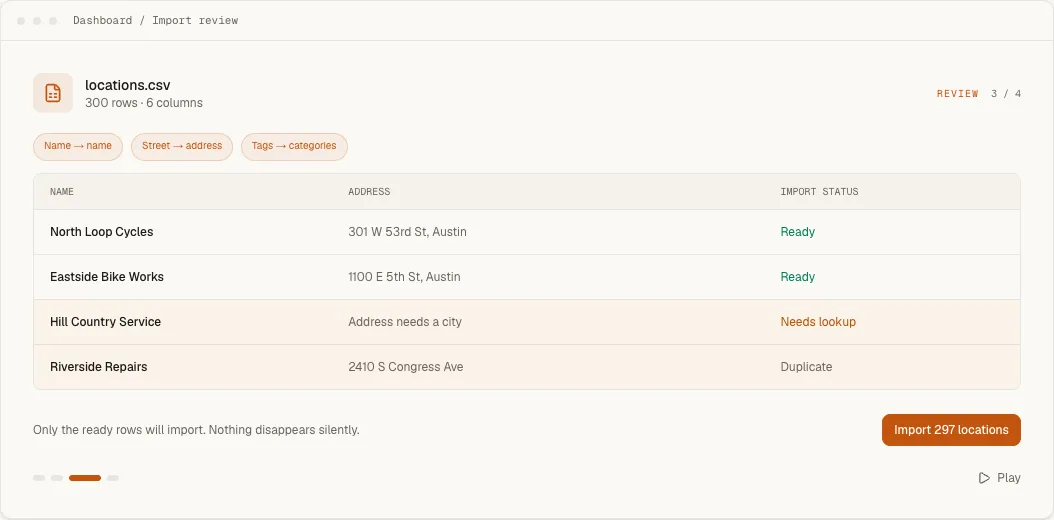
Manage physical stores, service areas and online stockists from one account. Add a single record, review a CSV import or connect Google Sheets, while the embed on your website stays the same.
7-day trial · No card required · Every working self-serve feature included
What this changes for the visitor and the team.
- 01
Use the location type that matches reality.
A record can be a physical point, a service area with a coverage radius, or an online stockist that appears beside nearby results.
- 02
Keep public details in one place.
Store the address, coordinates, contact details, description, image, opening hours, categories and custom fields used by the live widget.
- 03
Change the data without touching the embed.
Visibility, priority and location details are managed in Handled. The script already installed on the website continues to load the current published list.
How it works
What the visitor sees and what you control.
Three location types, three different answers
A storefront has an exact address and map pin, and takes part in nearest-first ordering. A service area has a centre point and a coverage radius, and the map draws that area as a circle whose fill, outline and opacity you choose, so a mobile or delivery business is not presented as a walk-in shop. The radius is stored in kilometres even when visitors see miles. An online-only location has no address or distance and appears in the locator's online tab instead of on the map. Give it the country codes it ships to and only visitors searching in those countries see it; leave them empty and everyone does.
The address and the pin are separate facts
Visitors see the address exactly as you entered it, while the coordinates decide where the marker or service circle sits. When geocoding lands on the wrong building, entrance or side of a large property, move the pin rather than rewriting the address. A location imported or sent through the API with an address that cannot be geocoded is still saved and listed among the locations needing attention, so a failed lookup is visible instead of quietly missing from the map.
Saved is not the same as shown
The Details tab holds phone, email, website, photo, description and your own custom fields. None of it appears publicly until you place it: Layout & fields decides what shows in the result card, the expanded detail view and the map popup. A custom field can render as a plain fact or as an action with its own label, URL, colour and icon, which is how Book service or Order online buttons are made. Phone numbers, capitalisation and postcode prefixes can be tidied for display without editing the source data.
Hours in the location's own timezone
Each location stores weekly hours in its own timezone, so opening time at a store in another region is calculated there rather than where the visitor sits. Hours drive the Open now filter, the live status on cards and the weekly table in details and popups, and a compact card can show Open now while the detail view carries the full week. Each day currently accepts one opening and one closing time, so check that an unusual schedule is described accurately before relying on the status.
Visibility, priority and mistakes
Hidden keeps a location in the dashboard without showing it publicly, which suits a branch that is temporarily closed. Priority lifts a flagship or preferred dealer above the rest, and a priority radius stops that promotion outside a sensible distance so a flagship in another city never outranks the branch across the road. Deleting is soft: the dashboard offers an undo at once, and analytics history for the location survives.
Workflow
From configuration to a checked public result.
- 1
Choose manual entry, CSV import or a connected Google Sheet based on who owns the source list.
- 2
Review coordinates, duplicate warnings, categories, hours and visibility before publishing.
- 3
Check a representative search in the real widget, then leave the existing embed in place as the list changes.
Included capability
- Physical storefronts, service areas and online locations
- Address, coordinates, phone, email, website, description and images
- Opening hours in each location's own timezone
- Categories, custom fields, visibility and priority
- CSV export so the location list is not locked in
- Self-serve plan capacity up to 10,000 locations; performance tested with 5,002
The boundary
Pro and Business accounts can use the Location API with account-scoped keys to read, create, update and archive locations. Webhooks fire when a location or lead changes. Handled does not currently run a bidirectional CRM or ERP sync or generate an indexable webpage for each record. Schedule synchronization in your own system when you need it.
Continue with the task documentation.
Add and edit locations
Choose a location type and maintain its public details.
Open guideSync from Google Sheets
Preview and schedule changes from a customer-owned sheet.
Open guideConnect a location API
Read and write locations with account-scoped API keys.
Open guideConfigure location hours
Set weekly hours, timezones and open-now behavior.
Open guideBefore you choose
Questions buyers ask about this feature.
- Which kinds of locations can I manage?
- Handled supports physical points, service areas with a coverage radius and online locations such as ecommerce stockists.
- Do I have to edit locations one at a time?
- No. Add individual records in the dashboard, import a CSV or connect Google Sheets for a reviewed synchronization workflow.
- Does updating a location require new embed code?
- No. The installed widget keeps the same site ID and loads the current published data from Handled.
- How many locations can one account hold?
- The self-serve plans hold 200 on Starter, 2,000 on Pro, 10,000 on Business locations. Above 10,000, pricing is scoped per customer rather than published.
- Can other systems add or change locations?
- Yes. Google Sheets, Airtable, Webflow CMS and HubSpot can be connected as scheduled sources that preview every change and never delete a location because its row went missing. Pro and Business accounts can also use the Location API, and signed webhooks report when a location changes.
Try the feature against your own location list.
Start with representative data, test the real visitor journey and keep the locator only if it handles the job your website needs.