Map customization
Make the locator feel native to the site around it.
Enter your public website URL to prepare an editable first draft from its brand signals, then refine the layout, colors, type, spacing, corners, buttons, result fields, marker treatment and map design. Prefer a human setup? Request the included done-for-you brand match after activating a paid plan.
7-day trial · No card required · Every working self-serve feature included
What this changes for the visitor and the team.
- 01
Start from your website.
Enter a public URL in Appearance and Handled inspects its public brand signals to prepare an editable first draft. Review it before anything is saved or published.
- 02
Start from structure, not decorative tweaks.
Pick from seven map, list and grid layouts, then control column width, map and list height, search and filter placement, selected state and the fields shown on each surface.
- 03
Carry recognizable brand decisions through, or let us help.
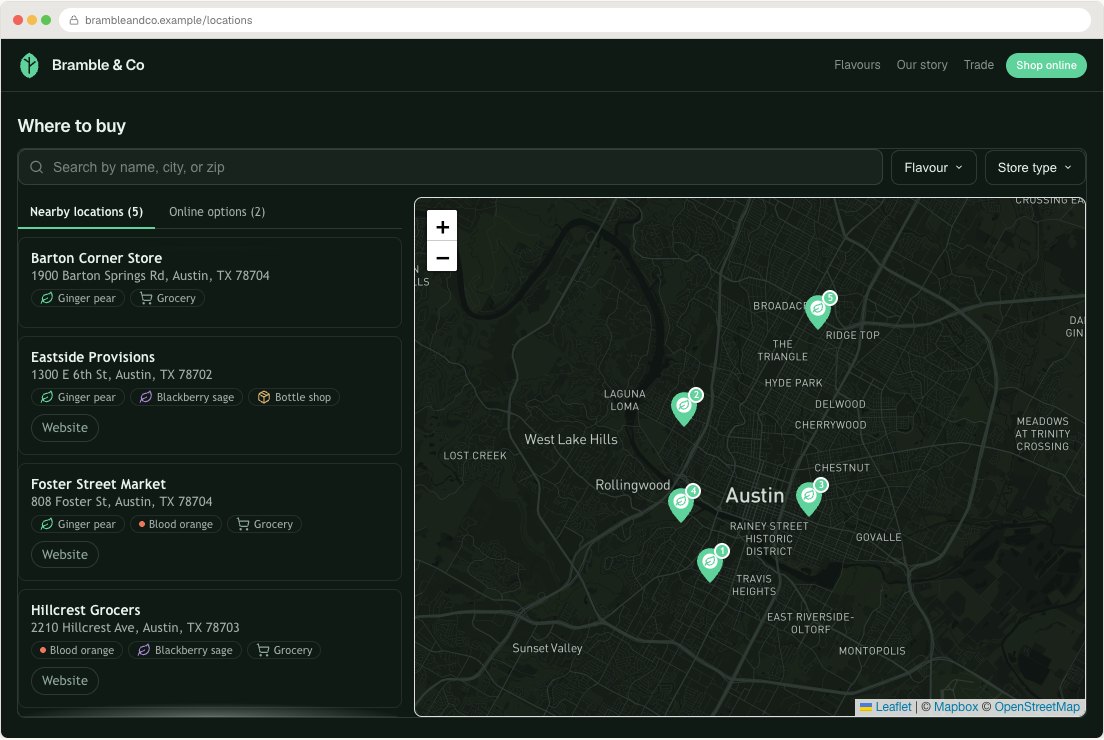
Apply colors, display and body fonts, spacing, corners, buttons, uploaded marker artwork, cluster shapes and a provider-managed map style to the real widget rather than a static mockup. Active Starter, Pro and Business plans also include one structured configuration and brand match, a desktop and mobile review, and one revision.
How it works
What the visitor sees and what you control.
Seven layouts, sized for the container
Put the list left, right or below the map, use a grid below it, or drop the map for a list or grid alone, or drop the list for a map alone. Side-by-side layouts expose a result column width; grid layouts expose the number of columns; widget width, map height and list height set the overall footprint. The locator responds to the width of the section containing it rather than only to the screen, so test it in the column where it will live.
Your map provider, your map style
Mapbox and Google Maps both offer Streets, Light, Dark and Satellite starting themes. When the base map itself is part of the brand, paste a published Mapbox Studio Style URL or a Google cloud Map ID and it replaces the built-in theme. The map is drawn with a browser key from your own provider account, so Mapbox or Google bills map traffic directly and Handled adds no margin to it. If the key is missing or rejected, the results list keeps working and a clear map setup message appears instead of an unlicensed fallback map.
Markers, artwork and clusters
Use a classic pin, a compact dot, your logo inside a pin or uploaded artwork drawn without a pin. Artwork is fitted without stretching and anchored at its bottom edge for something that points, or its centre for a badge. Pins and dots can take each category's colour or your brand accent, and one location can carry its own colour. Uploaded artwork is never recoloured, so prepare its final colours in the file. Crowded areas can cluster into numbered bubbles shaped as circles, rounded squares or squares, which split apart as the visitor zooms in.
Result cards, popups and every word
The field-layout editor decides what appears in result cards, the expanded detail view and map popups, with one or two popup columns. Cards can be left-aligned or centred, carry the distance with the details or below the buttons, and mark the selected result with an accent border, a stripe or a tinted background. Links can show as text, icons and text, or icons alone. Every visitor-facing string can be rewritten, and the interface can be held in several languages and matched to each visitor.
Isolated from your stylesheet
The locator renders inside a shadow root, so the website's CSS cannot break it and it cannot break the website. Colours, fonts, spacing and corners are controls rather than code; scoped custom CSS is there for the small brand detail the controls cannot express. There is no Handled branding on any plan. The only credit shown is the map provider's attribution, which its licence requires.
Workflow
From configuration to a checked public result.
- 1
Enter a public website URL, or choose a worked example or layout direction that matches the visitor's job.
- 2
Review the editable draft, then apply the website's logo, colors, typography, map style, marker artwork and shape language in the live responsive preview.
- 3
Inspect desktop and mobile, publish the approved settings, or request our done-for-you setup and one included revision after activating a paid plan.
Included capability
- Seven map, list and results-grid layouts with adjustable side-column width
- Mapbox or Google Maps with built-in themes or your published custom style
- Dots, pins, logo markers and uploaded PNG, WebP or safe SVG artwork
- Numbered markers and circle, rounded-square or square clusters
- Separate body and display typography, spacing and corner controls
- Configurable result-card, popup and detail fields
- Website inspection that prepares an editable brand draft
- Done-for-you brand matching with one included revision on active paid plans
- Custom labels and CSS for supported edge cases
The boundary
Done-for-you brand matching configures the existing locator controls; it is not a website redesign, custom product development or ongoing design retainer. One initial configuration and one revision are included after a paid plan is active.
Continue with the task documentation.
Before you choose
Questions buyers ask about this feature.
- Can Handled Locator match my website?
- Yes. You can configure the design yourself, and active Starter, Pro and Business plans include one initial done-for-you brand match and one revision.
- Can I use Mapbox or Google Maps?
- Yes. Choose either provider and connect your own browser key. Use a built-in theme, a published Mapbox Studio Style URL or a Google cloud Map ID.
- Can I upload my own map marker?
- Yes. Upload transparent PNG, WebP or safe SVG artwork, set its rendered size and choose whether its center or bottom edge sits on the coordinate.
- Can I add custom CSS?
- Yes. Use the built-in controls first, then add scoped custom CSS when a small brand detail cannot be expressed safely through those controls.
- Does restyling the locator need new embed code?
- No. Layout, colours, map style and markers are dashboard settings. Save a change and the live locator picks it up; the snippet stays exactly as it was pasted.
Try the feature against your own location list.
Start with representative data, test the real visitor journey and keep the locator only if it handles the job your website needs.