What a territory is
A territory decides which location owns an address. Open Locations → Territories, choose a location, and give it the postcodes from its agreement.
That is a different question from a service radius, and the two are set in different places for that reason.
- A service radius describes reach. It is a property of one location, it is drawn on the map, and three locations can cover the same street while all three are telling the truth.
- A territory describes ownership. Exactly one location wins an address, the winner is decided by rules you control rather than by distance, and the answer is the same for every visitor who searches that address.
Territories change what a visitor is shown, and they decide who an enquiry is sent to when the enquiry form is switched on. Everything else about the locator is unaffected: a network with no territories published behaves exactly as it did before.
See it working
Northwind Cycles, one of the example locators, has two territories published in preferred mode. One of them gives the Evanston and Skokie postcodes to the Skokie shop.
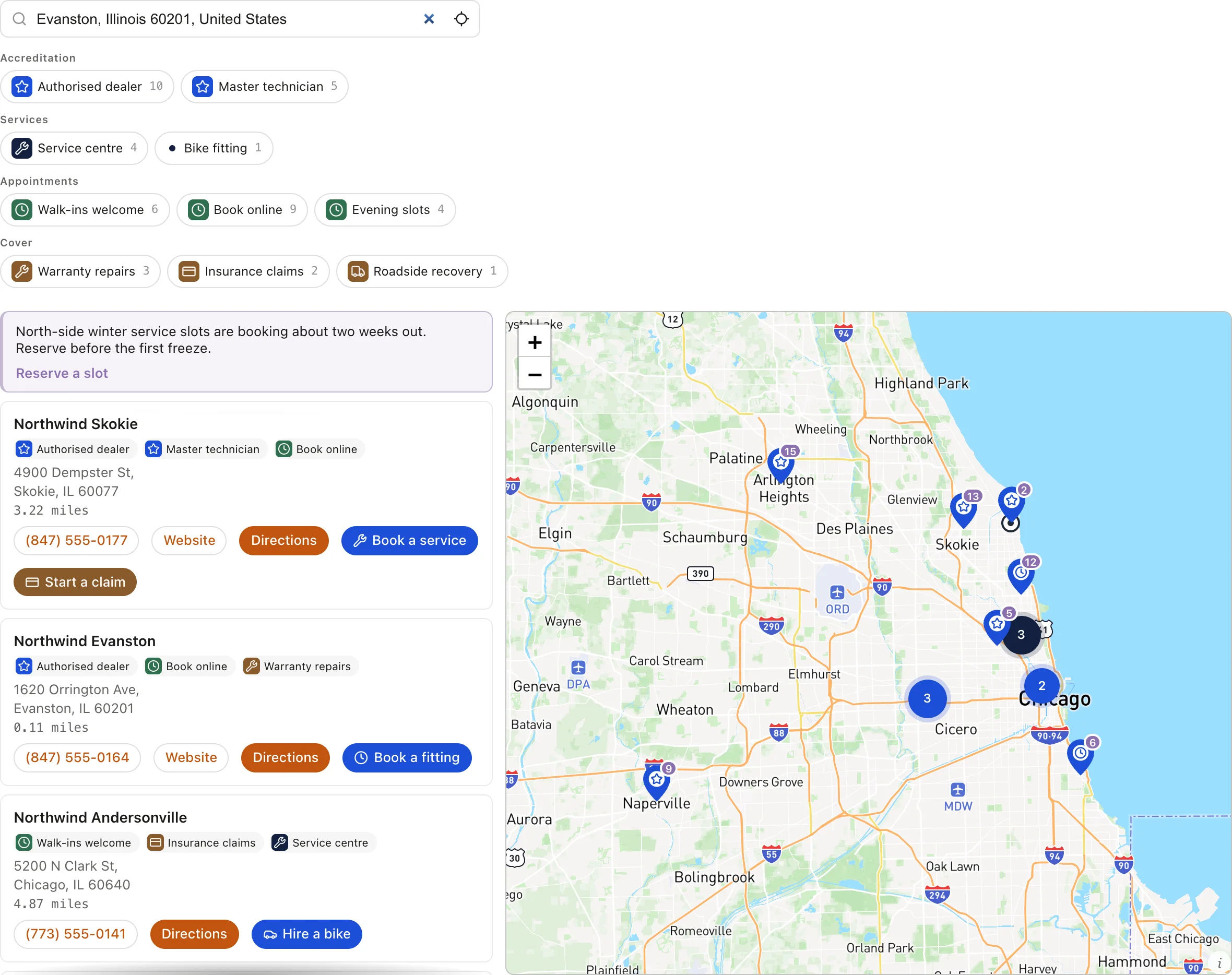
Two things about that picture are worth knowing before you test your own. The list is sorted by distance, which is not the default: under the default sort a territory still decides the winner, but you cannot see it happen. And the search was typed and submitted rather than picked from the suggestions, because only a submitted search is geocoded and only a geocoded search carries a postcode. An autocomplete row hands the locator bare coordinates, and a territory written as a postcode list has nothing to match against those. It is the same limitation described under test an address, and it is the commonest reason a rule looks as though it did not work.
Preferred mode is what pins the owner and keeps everyone else. The same territory published as exclusive would show Skokie and nothing else for those postcodes, and as fallback would show it only when the ordinary search came back empty. All three are the same rules, published differently.
Assign postcodes
Choose the location, press Add territory, then open the row and paste. A spreadsheet column, a comma list or a wrapped paragraph all work, because the paste is split on spaces, commas, semicolons and line breaks. Postcodes are upper-cased and their spaces removed, so SW1A 1AA and sw1a1aa are the same code. Up to 5,000 postcodes go in one rule, and a territory can hold several rules.
Each rule is either Covers or Except:
- Covers adds those postcodes to the territory.
- Except carves them back out. An Except rule beats every Covers rule inside the same territory whatever the ranks say, which is what makes "these three districts, minus this town" mean what it reads like. It removes that one territory from the running for those addresses; it does not stop another dealer owning them.
An entry ending in an asterisk covers a prefix. 750* takes every postcode starting 750, M5V* takes a Canadian forward sortation area, and SW1A* takes a British outward code. An entry without an asterisk matches exactly and only exactly, so 10001 does not catch 10001-1234 and M5V on its own catches nothing at all. Most agreements are written as districts rather than as individual codes, so most rules are prefixes.
Overlaps and rank
Real networks overlap on purpose: a national account holder laid over regional dealers, a handover while a dealership changes hands, a flagship keeping a city carved out of a larger patch. Each territory carries a Rank, and the lowest rank wins.
Rank is read first, before anything about the shape of the territories, so an intentional overlap is settled by one number instead of by redrawing lists. Where ranks tie, an exact postcode beats a prefix, and after that a smaller area beats a larger one. The remaining ties are broken the same way on every request, so the same address always produces the same owner.
The eye icon on a row pauses a territory. Its rules are kept and it stops being a candidate at the next publish, which is what to use while a dealer is suspended rather than deleting their postcodes.
Publish, and choose a mode
Publishing and choosing a mode are the same action: the four buttons on the Publish card each compile every territory and set how hard the result lands. Publishing needs an admin or owner; editing rules needs an editor.
- Off ignores territories and ranks results by distance, as before. Your rules are kept.
- Preferred pins the owning location first and still lists the rest of the network.
- Exclusive shows only the owning location for an address inside its patch, taken from the full list, so an owner outside the search radius still appears.
- Fallback shows the owning location only when the ordinary search found nothing. It can add a result and never removes or reorders one, which makes it the safe mode while coverage is incomplete.
The card says which of those visitors are getting right now, and warns when territories have been edited since the last publish. Press the mode again after any edit: publishing recompiles the whole map, and a rule that has not been published does not exist as far as the locator is concerned.
The fallback location
Under When no territory covers an address, name a location to answer for ground nobody was given. It is used as a preferred owner, never an exclusive one, so a gap in coverage pins head office at the top rather than hiding the rest of the network. Leave it set to rank by distance if you would rather an uncovered address behave exactly as it did before territories existed.
Test an address
The Test an address box answers against what is published, which is the only answer worth checking. Type any address and it reports the place and postcode it resolved to, the territory that owns it, the step that decided, and every other territory that also covered the address with the point at which each one lost.
It also distinguishes the two ways an address can have no owner: nothing covered it, or something covered it and explicitly excluded it. That is usually the fastest answer to a dealer asking why an address is not theirs.
Route enquiries to the owner
Territories can decide who hears from the visitor, not only who the visitor sees. Under Configure → Search & location → Enquiry form, set Show after a search. It is Off by default and stays off until you change it.
The form appears under the results once a visitor has searched, because before a search there is no address to route against. It asks for a name and email, with phone and message optional. It does not ask which location to contact, and that is the point: a visitor choosing from a list picks whoever is nearest or listed first, which is the behavior territories exist to replace.
When it is sent, the server decides who gets it, in this order:
- The territory owner for the address the visitor searched. This is used whatever mode you published, because mode decides what a visitor is shown while an enquiry belongs to whoever owns the ground.
- The fallback location you named, when no territory covers the address.
- The nearest location, which is what every locator did before territories existed.
That location is emailed the enquirer's details, what they typed, and a plain sentence saying why it came to them, naming the territory and the postcode that matched. Replying to that email reaches the customer directly. The email also carries a link that marks the enquiry handled, which needs no account and no login and is specific to that one enquiry, so it should not be forwarded. Where a location has no email address of its own, the account owner is notified instead so the enquiry still reaches a person.
The visitor gets a confirmation naming the location their enquiry went to, so they know who to expect a reply from.
Every enquiry is listed under Locations → Leads, filterable by New, Handled and Spam, showing the location, the territory and how it was routed.
What territories do not do
- Only a typed address search carries a postcode. A place typed into the search box is geocoded, so it resolves a postcode and a territory can match it. Use my location, the approximate position resolved when the page loads, and an address picked from autocomplete all arrive as coordinates with no postcode, and those searches rank by distance as they always did. On a phone that is the common path, so treat territories as deciding the typed search rather than every visitor.
- Counties, states and drawn shapes cannot be created. There is no region picker and no drawing tool anywhere in the dashboard, and outside the United States no boundary data is loaded, an unresolved licensing question rather than a missing script. An area granted as a county or a region has to be written as postcodes today. Where the agreement grants a district, a prefix rule expresses it in one line.
- A lead goes to an inbox, to your dashboard, and to any webhook you register. The
lead.createdwebhook carries the enquiry and who it was routed to, which is how it reaches a CRM or a Zap. The API has no leads endpoint to read them back, and a dealer has no login beyond the single-enquiry status link. - Territories do not hide a location. In Preferred and Fallback modes the rest of the network is still listed, and in Exclusive mode the owner replaces the list only for addresses a territory covers. To keep a location off the map entirely, hide the location itself.
Search behavior itself, including which searches produce a point to measure from, is covered in configure visitor search. Every setting named here also appears in the widget settings reference.