Run the install check
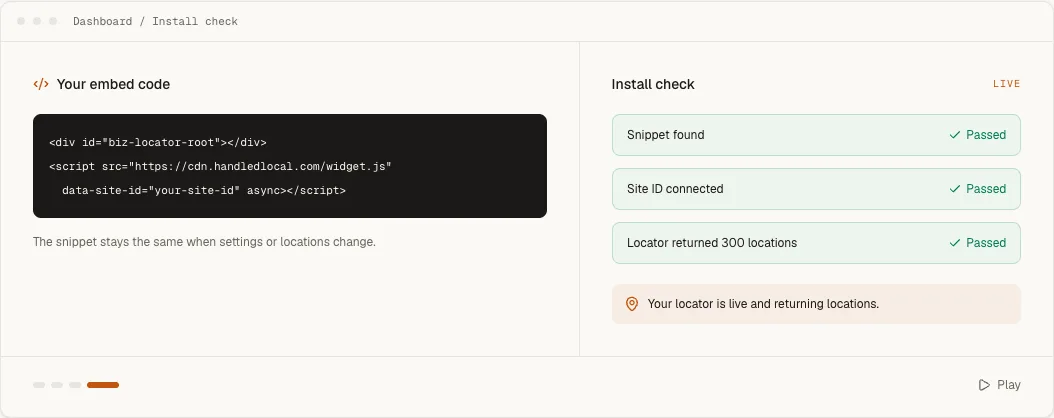
Open Embed & Install, enter the exact public URL and run Check installation. Use the result to separate four questions: did the script load, did the site ID connect, did the account return locations and did a public page reach the locator?
Nothing appears
- 1
Confirm the public URL
Editor previews often suppress third-party scripts. Test the published page in a new tab. - 2
Inspect the saved snippet
Confirm that the root<div>, complete<script>tag and account-specific site ID survived saving. - 3
Check account state
The trial must still be active or a paid plan selected, and at least one location must be visible. - 4
Check browser errors
A content-security policy or platform sanitizer can block the external script even when the code remains visible in the editor.
Results without a map
When results load but the map reports a missing or rejected key, the embed and location data are working. Confirm that the provider selected under Configure → Map matches the key saved under Embed & Install. Restrict that browser key to the public website domain, not only the Handled dashboard.
Layout or clipping
If the locator is present but narrow, clipped or unusually short, inspect its parent container on the host website. Wix HTML elements and other framed embeds need an explicit height. Webflow and WordPress containers can apply width, overflow or column rules around the custom element.
Test desktop and mobile separately. The locator responds to its container width, so a page builder's mobile column can trigger the compact layout even when the overall browser is wide.