Locator analytics
See where visitors act and where the network falls short.
Measure sessions, successful and unsuccessful searches, location opens, directions and visitor actions. Use no-result searches as a question to investigate rather than a vanity chart.
7-day trial · No card required · Every working self-serve feature included
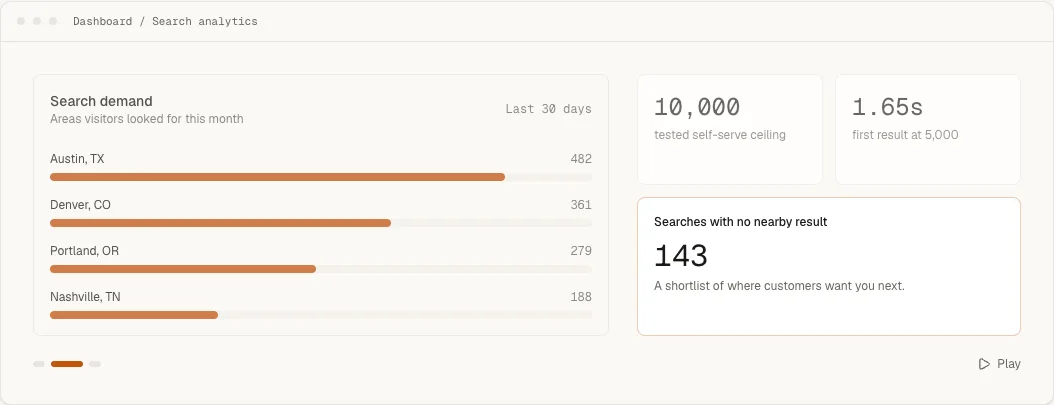
What this changes for the visitor and the team.
- 01
Separate browsing from intent.
Sessions establish reach; directions, phone, website, email and configured-link actions show how often a visitor continues toward a location.
- 02
Find demand the current network misses.
Completed searches with no nearby result reveal geographic gaps, while the surrounding configuration helps distinguish real demand from an overly narrow radius.
- 03
Compare locations on the same signals.
Rank locations by opens, actions and directions, and export the chosen period when the underlying data needs to be reviewed elsewhere.
How it works
What the visitor sees and what you control.
Four headline measures, four different questions
Widget sessions count public browsing sessions in the period. Directions taps are the clearest standard signal that someone intends to visit. Visitor action rate is the share of sessions that reached a phone, email, website, custom-link or directions action. Unmet demand is the share of completed searches that returned nothing. Dashboard previews and documentation captures are excluded, so the numbers describe activity on your public embeds rather than your own testing.
Search outcomes and search reach
Search outcomes separate searches that found at least one location from those that found none. Search reach puts a distance on the same question: the average distance from a searched place to the nearest location, and the share of searches made more than 50 km from any location. A rising average with a steady no-result rate usually means the radius is doing its job while the network thins at the edges. Popular filters lists the tags visitors most often had active, which is a sensible order for your filter groups.
A funnel that stays proportional
The funnel reports each stage as a share of the stage immediately before it, not as a share of every load. A drop late in the journey therefore reads in proportion to the visitors who actually reached that decision, instead of looking tiny beside the initial session count. Periods of 7, 30 or 90 days, or a custom range, compare against the immediately preceding period of the same length.
Actions and top locations
The action breakdown separates directions, phone, website, email and custom links, so use of a booking button is not buried inside a general click count. Top locations rank by opens, actions or directions for the chosen period, which shows where visitors act rather than only where they look. Export CSV takes the period's figures, with the comparison period beside them, out for review elsewhere.
Your own analytics, on your terms
The widget dispatches versioned browser events when it is ready, when a visitor searches, gets no results, selects a location, opens directions or uses an action, and a few lines push them into a Google Tag Manager dataLayer. Payloads carry the mode, counts and location ids, never the typed search text, resolved place, coordinates or contact values. A search or opening triggered by your own page script fires the same events as a visitor's, marked with source api on the location event.
Workflow
From configuration to a checked public result.
- 1
Choose a 7, 30 or 90 day period, or compare a custom period with the immediately preceding one.
- 2
Read sessions, actions, directions and search outcomes as separate stages rather than one combined score.
- 3
Investigate no-result searches against radius, search mode and data quality before treating them as expansion evidence.
Included capability
- Widget sessions and location opens
- Directions, phone, email, website and custom-link actions
- Successful searches and searches with no result
- Geographic search-demand summaries
- Top locations by opens, actions or directions
- Date comparison and CSV export
The boundary
Locator analytics show behavior inside the embedded locator, not revenue attribution or footfall. Browser events can connect privacy-safe interactions to your own analytics, but their payloads intentionally exclude visitor queries, coordinates and contact details.
Continue with the task documentation.
Before you choose
Questions buyers ask about this feature.
- Which actions does Handled Locator measure?
- The dashboard separates directions, phone, email, website and configured custom-link actions, alongside sessions, searches and location opens.
- Can I find searches with no nearby result?
- Yes. Unmet-demand reporting shows completed searches that returned no nearby location so you can investigate coverage, radius and data quality.
- Do widget events expose what a visitor typed?
- No. Documented browser-event payloads intentionally exclude visitor queries, coordinates and contact details.
- Are my own previews counted?
- No. Dashboard previews and documentation captures are excluded, so the report reflects activity on the public embeds visitors actually use.
- Can I send locator activity to Google Analytics or Tag Manager?
- Yes. Listen for the widget's browser events on the page and push the ones you need into your own analytics, for example a Google Tag Manager dataLayer entry when a visitor selects a location.
Try the feature against your own location list.
Start with representative data, test the real visitor journey and keep the locator only if it handles the job your website needs.