
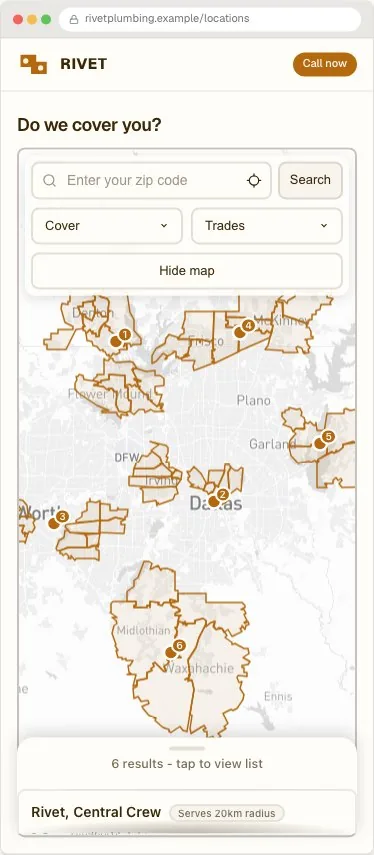
Who builds a service-area map
The shape repeats across every trade that travels to the customer rather than trading from a shopfront: a plumbing or drain company like Mr. Rooter or Roto-Rooter dispatching to a postcode, an HVAC business like Aire Serv or One Hour Heating & Air Conditioning covering a metro area, a pest control company like Terminix or Orkin routing technicians by territory, a cleaning franchise like Merry Maids or MaidPro, a home healthcare provider like Home Instead or Right at Home, a moving company like Two Men and a Truck, or a handyman and installation franchise like Mr. Handyman. None of them have a location a customer visits; all of them need to answer do you cover me before anything else on the page matters.
None of that changes the build below. A single-truck local plumber and a hundred-territory national franchise use the same data model; the franchise's list is just longer and each territory belongs to a different owner.
The trades this shape fits
The filters worth building follow from what the business actually dispatches: a crew, a technician, or a delivery zone.
| Trade category | Real examples of the shape |
|---|---|
| Plumbing and drain | Mr. Rooter, Roto-Rooter |
| HVAC and home comfort | Aire Serv, One Hour Heating & Air Conditioning |
| Pest control | Terminix, Orkin |
| Cleaning and maid service | Merry Maids, MaidPro |
| Home healthcare | Home Instead, Right at Home |
| Moving and delivery | Two Men and a Truck |
| Handyman and installation | Mr. Handyman |
Explain coverage before asking for contact details
A service-area locator helps a visitor answer one question first: can this business serve my address? State whether results represent branches, technicians, delivery zones or approximate coverage. The map should support that explanation, not replace it. A visitor who cannot tell whether a shaded circle is a guarantee or a rough estimate will call to ask, which defeats the point of putting the map on the page.
Model the service honestly
Use location records for branches, crews or providers, and add a coverage radius or service-area field when the product supports it. Do not draw a precise boundary that the business cannot actually guarantee; a radius that is honestly approximate is more trustworthy than a sharp-edged zone that overstates certainty at the boundary.
- Service type or appointment category
- Cities, postcodes or regions covered
- Response or appointment information
- Phone, booking or quote action
- A clear outside-area message
Handle an address outside the area
Give visitors a next step when there is no nearby match. Offer a wider search, a contact form, an online option or a message explaining where coverage is planned. A useful no-results state can turn an unavailable service into a qualified enquiry rather than a closed tab, and it is worth writing deliberately rather than leaving as the product's generic default.
Test geography on a real phone
Test an address inside the area, one near the edge and one outside it. Check that permission denial still leaves a manual search path and that the map does not jump to an unexpected region. Most of this traffic is someone standing at the address in question, on a phone, mid-decision, so the phone layout is not a secondary check here.
Connect the provider carefully
Review the map provider guide and restrict browser keys to the domains that host the locator. The map cost calculator estimates what Google Maps or Mapbox will actually bill once traffic grows, and the feature overview explains the search, map and visitor-journey controls available in Handled. The service area locator overview shows the finished pattern.
Frequently asked questions
Does a service-area locator need a fixed radius per location?
No. A location record can carry a coverage radius, or you can describe the zone with named cities, counties or postcode ranges when a circle does not match how the business actually dispatches work.
What should happen when a visitor's address is outside every zone?
Give them a next step rather than a dead end: a wider search, a contact form for a custom quote, or a message explaining that coverage is planned there. A good outside-area message can turn an unavailable service into a qualified enquiry.
Can I show individual technicians instead of branches?
Yes. Each location record can represent a branch, a crew, or an individual technician, each with its own coverage, categories and contact action, the same way a multi-location retailer filters between its stores.
How is this different from a dealer or franchise locator?
A dealer or franchise locator answers which location is nearest to visit. A service-area locator answers whether a business that travels to the customer covers a given address at all, which is why coverage zones matter more than distance to a pin.