
What makes a dealer locator its own thing
Brands with dealer networks, vehicles, bikes, equipment, HVAC, machinery, audio, share a problem the plain shop-finder does not have: the value of the page is the authorisation itself. A visitor searching find a dealer is asking who is legitimate, because the products are expensive, the warranties matter, and grey-market sellers exist. The locator is your public register of who you stand behind. Tyre and equipment brands like Firestone and Bridgestone are the clearest version of this: the dealer network is the business, and the locator is how a driver tells an authorised installer from anyone else selling the same size tyre.
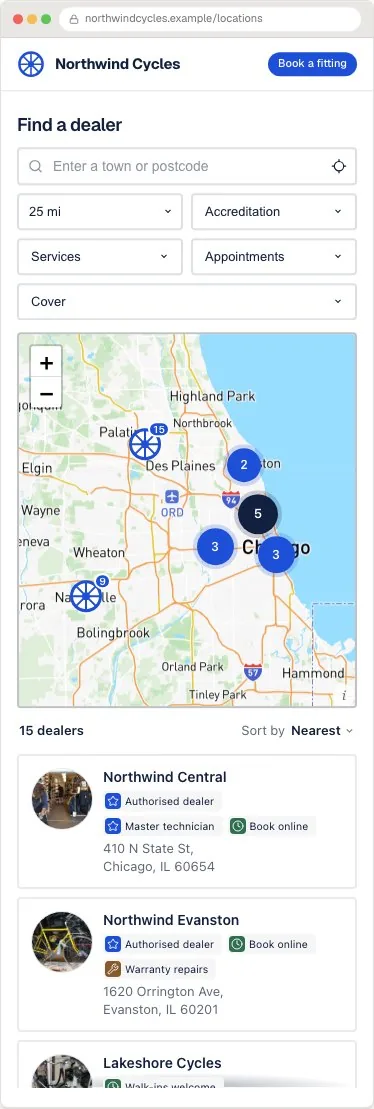
That reframing decides most of the design questions. Accreditation belongs on the result card, visibly, because it is the answer to the question being asked. Tiers belong there too if you have them, a premier dealer and an authorised reseller are different promises. And a dealer who leaves the programme must leave the page the same week, because every day a lapsed dealer stays listed, your register is testifying to something untrue.
| Network type | Real examples of the shape |
|---|---|
| Tyre and automotive service | Firestone, Bridgestone, NAPA |
| HVAC and home equipment | Trane, Carrier, Generac |
| Outdoor power equipment | Toro, Husqvarna, Stihl |
| Marine and powersport | Yamaha, Mercury Marine |
The data model: branches, capabilities, accreditation
Three modelling decisions separate dealer locators that work from ones that embarrass the channel team.
- One row per branch, never per company. A dealer group with nine locations is nine rows with the same accreditation and different addresses, phones and hours. A visitor cares about the branch near them; a single pin at head office makes a national partner look like one shop.
- Capabilities as filterable fields, not prose. Sales, service, parts, warranty work and any specialisations are separate columns, because the person with a broken machine needs service today and does not care who sells new ones.
- Accreditation as structured data with a review date. A tier column and a last-verified column cost nothing at import time and make the quarterly audit a sort instead of a phone-around.
Build it in five steps
The embed mechanics are the same as any locator; the any-website guide lists the paste point for each platform. The dealer-specific work is in the data.
- Export the dealer list from wherever the channel team keeps it, and reshape to one row per branch with name, address, phone, website, hours, capabilities and tier.
- Import, then fix what the report flags. Dealer addresses are dirtier than shop addresses, industrial estates and unit numbers geocode worse than high streets, so spot-check the pins for your ten biggest dealers on the map.
- Turn capabilities and tier into filters, and set each card to show the accreditation badge, the branch phone number and a directions link. Link to the dealer's own site only where it is worth a visitor's time.
- Style the widget to the brand and embed it on a page named the way people search, Find a dealer, and put it in the main navigation.
- Test as a visitor with a job: find a service point in a town you cover, call the number, and confirm it rings the branch, not head office. That one test catches the most common data fault on dealer pages.
Keeping a network you do not own accurate
Dealers change hours, move premises, get acquired and leave programmes, and none of them will update your website when they do. Accuracy is therefore a workflow question, not a data-entry question.
The pattern that works: the dealer list lives in a Google Sheet the channel team already maintains, synced to the page, so the person who signs or terminates a dealer edits one row and the public register follows. Then a quarterly pass sorted by last-verified date, oldest first, and a rule that termination day is delisting day. The failure mode that costs most is not a missing new dealer, it is a terminated one still wearing your badge.
The locator's search data pays the channel team back: searches in territories with no dealer are a ranked list of where to recruit next, which is the same demand-mapping read a where-to-buy page gives a consumer brand.
Where Handled Locator fits
Handled Locator handles the dealer shape directly: per-branch rows from CSV or a synced Google Sheet, accreditation and capability fields as filters and card badges, per-card links and phone numbers, and 85+ settings so the page carries the brand's design language. The map runs on your own Google Maps or Mapbox key at provider cost, and search analytics show the no-result territories the channel team will want.
Plans start at $19 a month for 200 branches and reach 10,000, which covers national networks. The dealer template preselects the right starting design, and the live examples include the Northwind dealer setup pictured above.
Frequently asked questions
What is a dealer locator?
A search page on a brand's website that shows the authorised dealers and service points near a visitor, with the accreditation visible on each result. It is the public register of who the brand stands behind, which is what separates it from a generic store finder.
How is a dealer locator different from a store locator?
Mechanically they are the same widget. The dealer version carries authorisation as the product: accreditation badges and tiers on cards, sales versus service versus parts filters, one entry per branch, and a maintenance rule that lapsed dealers leave immediately.
Should each dealer branch have its own entry?
Yes, always. Visitors search by where they are, and a dealer group pinned once at head office makes a nine-branch partner invisible in eight towns. Same accreditation, different addresses, phones and hours per row.
Should the locator link to dealers' websites?
Only where the dealer's site gives a visitor something, opening hours, booking, directions beyond what your card shows. A link to a neglected dealer homepage is worse than no link; the phone number and directions carry the real traffic.
How do I keep dealer information up to date?
Make the channel team's own list the source: a synced sheet they already maintain, a quarterly pass sorted by last-verified, and delisting on termination day. A locator fed from a document nobody owns goes stale in one quarter.
Can the locator help us find where to recruit dealers?
Yes. Searches that return no nearby dealer are demand with no supply, mapped to towns. Sorted by volume, that list is the strongest evidence a channel manager can bring to a recruitment plan.