
Product locator or where to buy page: which are you building?
The two share a data model and often a widget, so they are easy to confuse. The difference is where the shopper starts. A where to buy page starts from the brand: someone who likes what you make wants to know where your range is sold. A product locator starts from one item: someone looking at a specific product, on your site, on a shelf at a friend's house or in an ad, wants the nearest store that carries that item and does not care about the rest of the range.
If you have not built the brand-level page yet, start with the where to buy guide, which covers retailer relationships, online sellers and reading search data as a sales map. This guide assumes that foundation and covers what changes when the product comes first.
| Where to buy page | Product locator | |
|---|---|---|
| Shopper arrives with | Interest in the brand | One product in mind |
| Usual entry point | Main navigation, packaging | A product page, an ad for one item, a QR code on one pack |
| First control on screen | Location search | Product filter, often already applied |
| Success looks like | Any nearby stockist | A nearby stockist that carries that item |
| Data it depends on | A current stockist list | A current stockist list with accurate product tags |
Decide what counts as a product
Before any data work, choose the level a shopper will filter at. Too coarse and the filter promises less than the shopper needs; too fine and nobody on your team can keep it accurate. The right level is the most specific one your retailers reliably stock as a set and your team can verify.
Most brands land on the product line or flavour. Individual pack sizes are rarely worth a tag unless the sizes are genuinely different purchases, such as a trial size stocked in pharmacies and a family size stocked in warehouse clubs. When in doubt, start coarser; splitting a tag later is easy, while a fine-grained tag that goes stale teaches shoppers to ignore the filter.
| Level | Example | Works when | Breaks when |
|---|---|---|---|
| Range | Hot sauces | You sell one category through most doors | Stores carry very different subsets |
| Line or flavour | Habanero Reserve | Retailers pick lines, not individual sizes | Rarely breaks; the usual choice |
| Size or variant | Habanero Reserve 150 ml | Sizes go to different channels | Nobody verifies sizes per store |
| SKU | HR-150-US | Distributor reports already list SKUs | Shoppers do not know SKU codes, so map them to readable names |
The data: one row per store, products as tags
Every store is one row with its name, full street address and a column listing the products it carries, separated by commas. In Handled those values become categories, and categories become the filter. A retailer with ten branches is ten rows, because the shopper cares about the branch nearest them.
Spelling is the part that quietly breaks product locators. Habanero Reserve and Habanero reserve (hot) become two filter options, and a shopper who picks one misses every store tagged with the other. Agree the exact product names once, create them as categories before the first import, and the import review names any value in the file that does not match an existing category instead of inventing a new one. The location sheet checklist covers the rest of the file shape.
If your retailer list comes from distributor reports, which list each store once per product, you do not need to pivot them. The importer folds lines that repeat the same store into one location and merges their products into its tags; the distributor reports guide walks through one. Online sellers go in the same list as locations of the type Online only, with no address, the same product tags, and the country codes they ship to, so a shopper in Canada is not sent to a seller that only ships within the US.
Put the product filter first
In a product locator the filter is the primary control, so it should be the first thing a shopper sees, especially on a phone. Group your product tags under a heading shoppers recognise, such as Products or Flavours, so they render as their own filter section rather than mixing with store types.
Each tag can carry a small uploaded image that appears in the filter and beside the tag on the result card. A product shot is faster to recognise than a name, particularly when your line names are similar. For five products or fewer, inline checkboxes show every choice at once; beyond that, a dropdown per group keeps the toolbar compact. Filter counts, on by default, show how many stores carry each product before the shopper selects it, which saves a click on a product with no stockists nearby.
Keep filter matching on match any unless shoppers genuinely need a store carrying several products at once. Match all narrows aggressively and returns nothing more often. The categories and filters guide has the settings.
Start the search from the product page
The shopper who most needs a product locator is already looking at the product. Every product page should hand them to the locator with that product selected, so they never have to find it twice. There are three ways to do that, and they suit different pages.
- Link with the filter applied. Add loc_tags= and the product's tag slug to your locator page's address, for example /where-to-buy?loc_tags=habanero-reserve, and use that as the Find it near me link on the product page. Add loc_near= with a town to pre-fill the search too. The shopper can clear the filter to see every stockist. The pre-filled search guide has the full format.
- Embed a locked locator on the product page itself. The embed snippet accepts a tag list, and the Embed and Install builder writes it for you. That embed shows only stores carrying the listed tags, and the lock holds whatever the shopper clears, so a product page can list its own stockists and nothing else.
- Drive a locator already on the page. If the locator sits lower on the same page, a button can set the product filter and ask for the shopper's location through the JavaScript API, without a reload.
- Point packaging QR codes and single-product ads at the filtered link rather than the general page, since those shoppers have already chosen the product.
Results and empty states for a one-product search
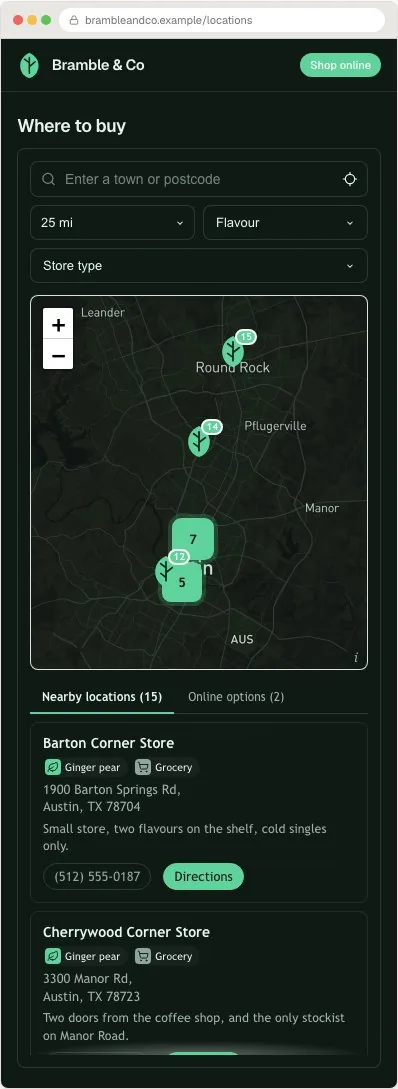
A result card in a product locator has one job: confirm the store carries the product before the shopper travels. Show the product tags on the card, the distance, a phone number so a cautious shopper can call ahead, and directions. If a retailer has a page for your product on its own site, link there rather than to its homepage.
A one-product search returns nothing more often than a general store search, so design that case on purpose. Online sellers appear in their own tab, narrowed by the same product filter, which gives the shopper somewhere to buy. The no-results setting chooses between an empty state and showing all locations with a note. Spotlight rules can go further: a banner that fires when a search finds nothing, or one that fires only when a particular product filter is on, with your wording and a link.
Test it like a shopper holding the product
Run these on a phone, on the published page, before you link to it from packaging.
- Open the Find it near me link from three product pages and confirm each lands with the right product selected.
- Search a town with several stockists and check every result carries the product it claims to.
- Search a town with none and read the empty state and the online tab as a shopper would.
- Pick the product with the fewest stockists and confirm the filter count matches what you expect.
- Clear the filter on a locked product-page embed and confirm the list stays limited to that product.
Where Handled Locator fits
Handled Locator covers each piece above: stores and online sellers imported from CSV or synced from Google Sheets, Airtable, Webflow CMS or HubSpot, products as tags with their own images, a grouped product filter, pre-filtered links and tag-locked embeds for product pages, and 85+ settings to match your site. The map runs on your own Mapbox or Google Maps key at provider cost.
Plans start at $19 a month for up to 200 locations, and Business holds up to 10,000. The where to buy setup guide has the product-filter clicks, and the live examples show the pattern running.
Frequently asked questions
What is a product locator?
A product locator is a search on a brand's website that shows the nearest stores carrying one specific product. The shopper chooses the product, usually by filter or by arriving from that product's page, and sees nearby stockists that carry it, with online sellers for anyone who has none nearby.
How is a product locator different from a where to buy page?
They use the same data. A where to buy page starts from the brand and lists every stockist of the range. A product locator starts from one product and shows only stores that carry it, usually opened from that product's page with the filter already applied.
Can a product locator show live stock levels?
Not reliably. Retail inventory changes hourly and most brands have no feed from their retailers. A product locator should promise which stores carry a product, which your team can keep accurate, and suggest calling ahead when availability matters.
How do I link from a product page to stores that carry that product?
Add the product's tag to the locator page link, for example ?loc_tags=habanero-reserve, so the locator opens with that product filtered. To show only that product's stockists on the product page itself, embed the locator with that tag locked in the snippet.
Should I tag products by SKU or by product line?
Usually by product line or flavour. Tag at the most specific level your retailers stock as a set and your team can verify. SKU-level tags go stale quickly and shoppers do not recognise SKU codes.